
Creating Local AI Agents
Local AI Agents — A Visual Guide
✦ Technical Guide

Creating Local AI Agents

Build autonomous AI systems that run entirely on your own hardware — no cloud dependencies, full privacy, complete control.

What is a Local AI Agent?

A local AI agent is an autonomous software system powered by a language model running on your own machine. It perceives its environment, reasons about goals, and takes actions — entirely offline.

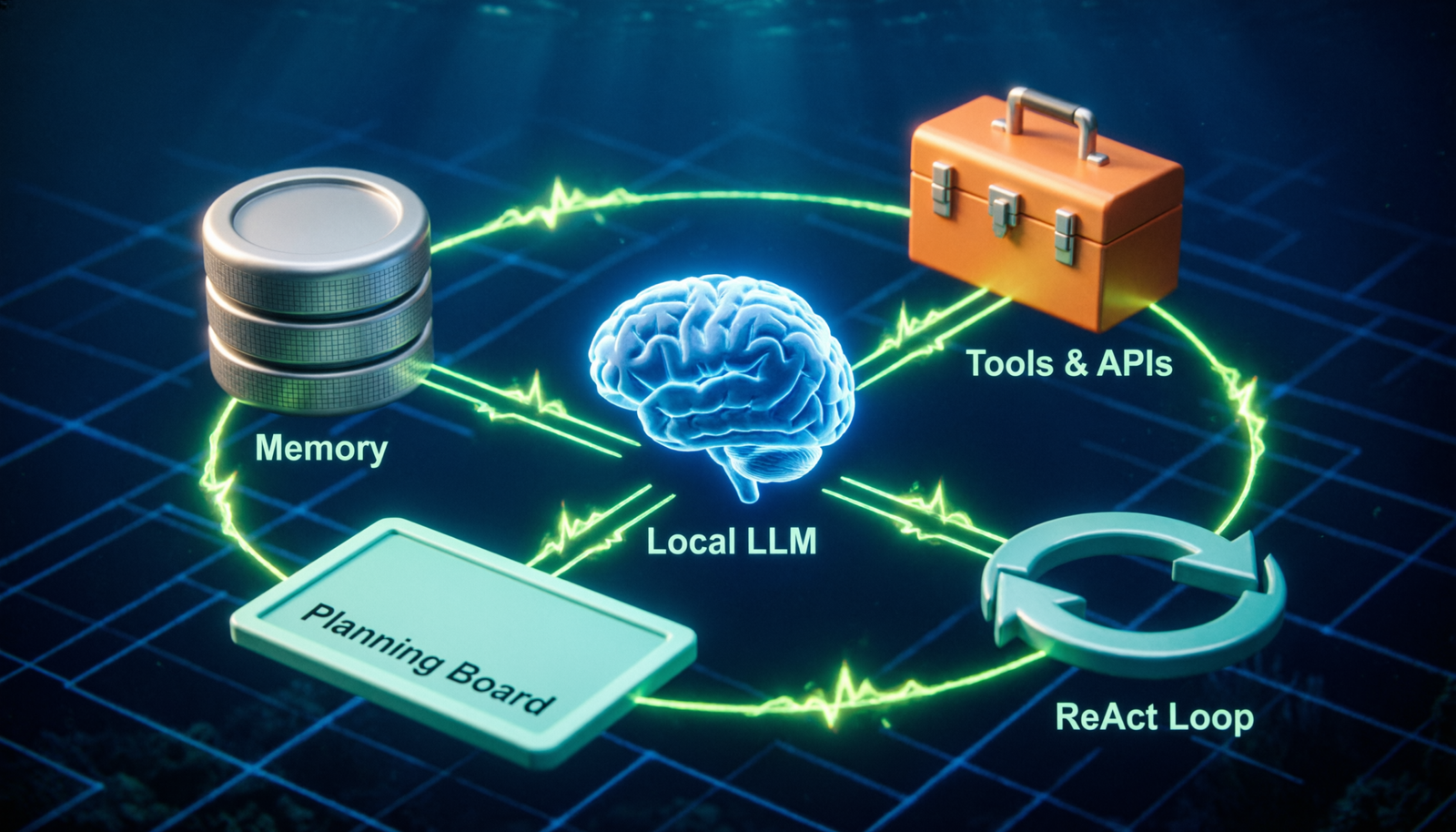
An AI Agent = LLM + Memory + Tools + Planning Loop — running locally on your hardware without sending data to external APIs.
🧠
Local LLM

Ollama, LM Studio, or llama.cpp running models like Llama 3, Mistral, Phi-3 locally.

💾
Memory Store

Short-term (context window) and long-term (vector DB like Chroma, FAISS) storage.

🔧
Tools

File I/O, web scraping, code execution, shell commands, APIs the agent can invoke.

🔁
ReAct Loop

Reason → Act → Observe cycle that keeps the agent iterating toward its goal.

📋
Planner

Task decomposition — breaks complex goals into ordered, executable sub-tasks.

🛡️
Guardrails

Safety checks, output validation, and human-in-the-loop confirmation gates.

How a Local AI Agent Works

Follow the reasoning loop from user input to final output — every decision point and action step visualized.

👤 User Input / Goal
📝 Parse & Understand Goal
💾 Query Memory & Context
📋 LLM Plans Next Action
🤔 Tool
Needed?
YES
🔧 Execute Tool
📊 Observe Result
💾 Update Memory
NO
✍️ Generate Response
✅ Goal
Complete?
NO
🔄 Loop Back to Plan
YES
🎯 Return Final Output

Local AI Agent Examples

Three practical agents you can build today using open-source tools and local models.

📂
File Organizer Agent
Filesystem · Ollama + LangChain
01 User says: “Organize my Downloads folder”
02 Agent scans directory, lists all files & extensions
03 LLM reasons about categories (images, docs, code…)
04 Agent creates folders & moves files using shell tools
05 Reports summary back to user, asks for confirmation
🔍
Research Assistant Agent
RAG · Chroma + Mistral
01 User asks a complex research question
02 Agent searches local document vector store (PDFs, notes)
03 Retrieves relevant chunks, builds augmented context
04 LLM synthesizes answer with citations to source files
05 Saves Q&A to memory for future sessions
💻
Coding Assistant Agent
Code Execution · Phi-3 + AutoGen
01 User describes a coding task or bug to fix
02 Agent reads relevant source files from the project
03 LLM writes code and tests in a sandbox environment
04 Executes code, catches errors, iterates until passing
05 Applies fix to real file, shows git diff for review

Building Your First Agent

A minimal Python agent using Ollama (local LLM) and LangChain — under 30 lines to get started.

# pip install langchain-community ollama from langchain_community.llms import Ollama from langchain.agents import initialize_agent, Tool from langchain.tools import tool import os # 1. Connect to local LLM (Ollama running llama3) llm = Ollama(model=“llama3”, base_url=“http://localhost:11434”) # 2. Define tools the agent can use @tool def list_files(directory: str) -> str: “””List files in a local directory.””” files = os.listdir(directory) return “\n”.join(files) @tool def read_file(filepath: str) -> str: “””Read contents of a local file.””” with open(filepath, “r”) as f: return f.read() tools = [list_files, read_file] # 3. Create agent with ReAct reasoning loop agent = initialize_agent( tools=tools, llm=llm, agent=“zero-shot-react-description”, verbose=True ) # 4. Run it! agent.run(“List the files in /home/user/Documents and summarize what’s there”)

Tools & Frameworks

The open-source ecosystem for building local AI agents has matured rapidly. Here’s what practitioners use.

Local LLM Runners
Ollama LM Studio llama.cpp GPT4All Jan.ai
Agent Frameworks
LangChain AutoGen CrewAI LlamaIndex Haystack
Vector Databases (Memory)
ChromaDB FAISS Qdrant Weaviate
Recommended Models (Local)
Llama 3.1 8B Mistral 7B Phi-3 Mini Gemma 2 9B Qwen 2.5
Local AI Agents Guide — Built with open-source tools. No cloud required.

Leave a Reply

Your email address will not be published. Required fields are marked *