

Bestseller #1

Bestseller #2

Bestseller #3

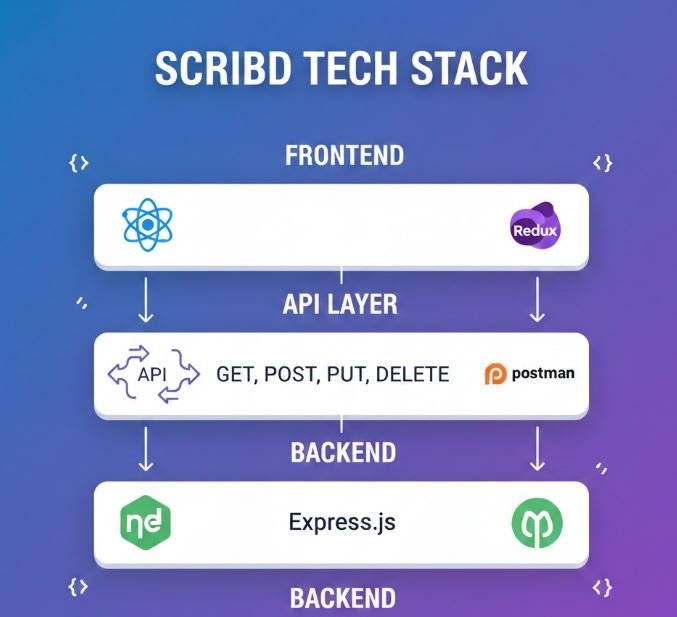
🚀 The Modern Stack
Scribd Tech Stack Cheat Sheet
React
Redux Toolkit
APIs
Backend
⚛️ React Fundamentals
Component Structure
Functional components are the modern way to write React components.
import React from 'react';

// Functional Component
const BookCard = ({ title, author, coverUrl }) => {
  return (
    <div className="book-card">
      <img src={coverUrl} alt={title} />
      <h3>{title}</h3>
      <p>by {author}</p>
    </div>
  );
};

export default BookCard;
React Hooks
useState
Manage component state
const [count, setCount] = useState(0);

const increment = () => {
  setCount(count + 1);
};
useEffect
Handle side effects
useEffect(() => {
  // Fetch data on mount
  fetchBooks();
}, []); // Empty array = run once
useContext
Access context values
const user = useContext(UserContext);
const theme = useContext(ThemeContext);
Complete Example: Document Reader Component
import React, { useState, useEffect } from 'react';

const DocumentReader = ({ documentId }) => {
  const [document, setDocument] = useState(null);
  const [loading, setLoading] = useState(true);
  const [currentPage, setCurrentPage] = useState(1);

  useEffect(() => {
    const loadDocument = async () => {
      try {
        const response = await fetch(`/api/documents/${documentId}`);
        const data = await response.json();
        setDocument(data);
      } catch (error) {
        console.error('Error loading document:', error);
      } finally {
        setLoading(false);
      }
    };

    loadDocument();
  }, [documentId]);

  if (loading) return <div>Loading...</div>;

  return (
    <div className="reader">
      <h2>{document.title}</h2>
      <div className="content">{document.pages[currentPage]}</div>
      <div className="controls">
        <button onClick={() => setCurrentPage(currentPage - 1)}
                disabled={currentPage === 1}>
          Previous
        </button>
        <span>Page {currentPage} of {document.totalPages}</span>
        <button onClick={() => setCurrentPage(currentPage + 1)}
                disabled={currentPage === document.totalPages}>
          Next
        </button>
      </div>
    </div>
  );
};

export default DocumentReader;
💡 Pro Tip: Always use functional components with hooks. They’re more concise and easier to test than class components.
🔄 Redux Toolkit
Store Configuration
Setting up your Redux store with configureStore
import { configureStore } from '@reduxjs/toolkit';
import booksReducer from './slices/booksSlice';
import userReducer from './slices/userSlice';

export const store = configureStore({
  reducer: {
    books: booksReducer,
    user: userReducer,
  },
});

export default store;
Creating a Slice
Slices contain reducer logic and actions for a feature
import { createSlice } from '@reduxjs/toolkit';

const booksSlice = createSlice({
  name: 'books',
  initialState: {
    items: [],
    loading: false,
    error: null,
    selectedBook: null,
  },
  reducers: {
    setBooks: (state, action) => {
      state.items = action.payload;
    },
    setLoading: (state, action) => {
      state.loading = action.payload;
    },
    selectBook: (state, action) => {
      state.selectedBook = action.payload;
    },
    addBook: (state, action) => {
      state.items.push(action.payload);
    },
    removeBook: (state, action) => {
      state.items = state.items.filter(book => book.id !== action.payload);
    },
  },
});

export const { setBooks, setLoading, selectBook, addBook, removeBook } = booksSlice.actions;
export default booksSlice.reducer;
Async Thunks
Handle asynchronous operations with createAsyncThunk
import { createSlice, createAsyncThunk } from '@reduxjs/toolkit';

// Async thunk for fetching books
export const fetchBooks = createAsyncThunk(
  'books/fetchBooks',
  async (userId, { rejectWithValue }) => {
    try {
      const response = await fetch(`/api/users/${userId}/books`);
      const data = await response.json();
      return data;
    } catch (error) {
      return rejectWithValue(error.message);
    }
  }
);

const booksSlice = createSlice({
  name: 'books',
  initialState: {
    items: [],
    status: 'idle', // 'idle' | 'loading' | 'succeeded' | 'failed'
    error: null,
  },
  reducers: {},
  extraReducers: (builder) => {
    builder
      .addCase(fetchBooks.pending, (state) => {
        state.status = 'loading';
      })
      .addCase(fetchBooks.fulfilled, (state, action) => {
        state.status = 'succeeded';
        state.items = action.payload;
      })
      .addCase(fetchBooks.rejected, (state, action) => {
        state.status = 'failed';
        state.error = action.payload;
      });
  },
});

export default booksSlice.reducer;
Using Redux in Components
import { useSelector, useDispatch } from 'react-redux';
import { fetchBooks, selectBook } from './slices/booksSlice';

const BooksList = () => {
  const dispatch = useDispatch();
  const { items, status, error } = useSelector(state => state.books);

  useEffect(() => {
    if (status === 'idle') {
      dispatch(fetchBooks(userId));
    }
  }, [status, dispatch]);

  const handleBookClick = (book) => {
    dispatch(selectBook(book));
  };

  if (status === 'loading') return <div>Loading...</div>;
  if (status === 'failed') return <div>Error: {error}</div>;

  return (
    <div>
      {items.map(book => (
        <div key={book.id} onClick={() => handleBookClick(book)}>
          {book.title}
        </div>
      ))}
    </div>
  );
};
💡 Pro Tip: Redux Toolkit drastically reduces boilerplate. Use createSlice instead of writing action creators and reducers separately.
🌐 API Integration & Postman
RESTful API Endpoints
| Method | Endpoint | Description | Request Body |
|---|---|---|---|
| GET | /api/documents | Get all documents | – |
| GET | /api/documents/:id | Get single document | – |
| POST | /api/documents | Upload new document | { title, file, category } |
| PUT | /api/documents/:id | Update document | { title, description } |
| DELETE | /api/documents/:id | Delete document | – |
Fetch API Examples
// GET Request
const getDocuments = async () => {
  try {
    const response = await fetch('https://api.scribd.com/api/documents', {
      method: 'GET',
      headers: {
        'Content-Type': 'application/json',
        'Authorization': `Bearer ${token}`
      }
    });
    const data = await response.json();
    return data;
  } catch (error) {
    console.error('Error fetching documents:', error);
  }
};

// POST Request
const uploadDocument = async (documentData) => {
  const response = await fetch('https://api.scribd.com/api/documents', {
    method: 'POST',
    headers: {
      'Content-Type': 'application/json',
      'Authorization': `Bearer ${token}`
    },
    body: JSON.stringify(documentData)
  });
  return await response.json();
};

// DELETE Request
const deleteDocument = async (id) => {
  await fetch(`https://api.scribd.com/api/documents/${id}`, {
    method: 'DELETE',
    headers: {
      'Authorization': `Bearer ${token}`
    }
  });
};
Axios Alternative
import axios from 'axios';

// Create an axios instance
const api = axios.create({
  baseURL: 'https://api.scribd.com',
  headers: {
    'Content-Type': 'application/json'
  }
});

// Add auth token to requests
api.interceptors.request.use(config => {
  const token = localStorage.getItem('token');
  if (token) {
    config.headers.Authorization = `Bearer ${token}`;
  }
  return config;
});

// API calls
export const documentAPI = {
  getAll: () => api.get('/api/documents'),
  getById: (id) => api.get(`/api/documents/${id}`),
  create: (data) => api.post('/api/documents', data),
  update: (id, data) => api.put(`/api/documents/${id}`, data),
  delete: (id) => api.delete(`/api/documents/${id}`)
};
Postman Collection Example
Here’s how to structure your Postman requests:
Environment Variables
{
  "base_url": "https://api.scribd.com",
  "auth_token": "your-token-here",
  "user_id": "12345"
}
Pre-request Script
// Set timestamp
pm.environment.set(
  "timestamp",
  new Date().toISOString()
);
Test Script
pm.test("Status 200", () => {
  pm.response.to.have.status(200);
});

pm.test("Response has data", () => {
  const json = pm.response.json();
  pm.expect(json).to.have.property('data');
});
⚙️ Backend Basics
Node.js + Express Server
const express = require('express');
const cors = require('cors');
const app = express();

// Middleware
app.use(cors());
app.use(express.json());

// Routes
app.get('/api/documents', async (req, res) => {
  try {
    const documents = await Document.find();
    res.json({ success: true, data: documents });
  } catch (error) {
    res.status(500).json({ success: false, error: error.message });
  }
});

app.post('/api/documents', async (req, res) => {
  try {
    const document = new Document(req.body);
    await document.save();
    res.status(201).json({ success: true, data: document });
  } catch (error) {
    res.status(400).json({ success: false, error: error.message });
  }
});

const PORT = process.env.PORT || 5000;
app.listen(PORT, () => console.log(`Server running on port ${PORT}`));
Database Models (MongoDB/Mongoose)
const mongoose = require('mongoose');

const documentSchema = new mongoose.Schema({
  title: {
    type: String,
    required: [true, 'Title is required'],
    trim: true,
    maxlength: [100, 'Title cannot exceed 100 characters']
  },
  author: {
    type: String,
    required: true
  },
  description: {
    type: String,
    maxlength: 500
  },
  category: {
    type: String,
    enum: ['book', 'article', 'research', 'magazine'],
    default: 'article'
  },
  fileUrl: {
    type: String,
    required: true
  },
  pages: {
    type: Number,
    min: 1
  },
  uploadedBy: {
    type: mongoose.Schema.Types.ObjectId,
    ref: 'User',
    required: true
  },
  views: {
    type: Number,
    default: 0
  },
  likes: [{
    type: mongoose.Schema.Types.ObjectId,
    ref: 'User'
  }]
}, {
  timestamps: true // Adds createdAt and updatedAt
});

// Indexes for better query performance
documentSchema.index({ title: 'text', description: 'text' });

module.exports = mongoose.model('Document', documentSchema);
Authentication Middleware
const jwt = require('jsonwebtoken');

// Middleware to verify JWT token
const authMiddleware = (req, res, next) => {
  const token = req.headers.authorization?.split(' ')[1];

  if (!token) {
    return res.status(401).json({
      success: false,
      message: 'No token provided'
    });
  }

  try {
    const decoded = jwt.verify(token, process.env.JWT_SECRET);
    req.user = decoded;
    next();
  } catch (error) {
    res.status(401).json({
      success: false,
      message: 'Invalid token'
    });
  }
};

// Protected route example
app.get('/api/user/profile', authMiddleware, async (req, res) => {
  const user = await User.findById(req.user.id);
  res.json({ success: true, data: user });
});
Error Handling
// Custom error class
class ApiError extends Error {
  constructor(statusCode, message) {
    super(message);
    this.statusCode = statusCode;
  }
}

// Error handling middleware
const errorHandler = (err, req, res, next) => {
  const statusCode = err.statusCode || 500;
  const message = err.message || 'Internal Server Error';

  res.status(statusCode).json({
    success: false,
    error: message,
    stack: process.env.NODE_ENV === 'development' ? err.stack : undefined
  });
};

// Use at the end of all routes
app.use(errorHandler);

// Usage in routes
app.get('/api/documents/:id', async (req, res, next) => {
  try {
    const doc = await Document.findById(req.params.id);
    if (!doc) {
      throw new ApiError(404, 'Document not found');
    }
    res.json({ success: true, data: doc });
  } catch (error) {
    next(error);
  }
});
Environment Variables (.env)
# Database
MONGODB_URI=mongodb://localhost:27017/scribd
# or MongoDB Atlas
# MONGODB_URI=mongodb+srv://user:pass@cluster.mongodb.net/scribd

# Server
PORT=5000
NODE_ENV=development

# Authentication
JWT_SECRET=your-super-secret-key-here
JWT_EXPIRE=7d

# File Upload
MAX_FILE_SIZE=10485760  # 10MB
UPLOAD_PATH=./uploads

# AWS S3 (if using)
AWS_ACCESS_KEY_ID=your-access-key
AWS_SECRET_ACCESS_KEY=your-secret-key
AWS_BUCKET_NAME=scribd-documents
// Load environment variables
require('dotenv').config();
const dbURI = process.env.MONGODB_URI;
const port = process.env.PORT;
💡 Pro Tip: Never commit .env files to git. Add them to .gitignore and provide a .env.example file for other developers.
✨ Best Practices
📁 Project Structure
scribd-app/
├── client/
│   ├── src/
│   │   ├── components/
│   │   ├── pages/
│   │   ├── redux/
│   │   │   ├── slices/
│   │   │   └── store.js
│   │   ├── services/
│   │   ├── utils/
│   │   └── App.js
│   └── package.json
├── server/
│   ├── controllers/
│   ├── models/
│   ├── routes/
│   ├── middleware/
│   ├── config/
│   └── server.js
└── package.json
🔒 Security Tips
- Use HTTPS in production
- Validate & sanitize user inputs
- Implement rate limiting
- Use helmet.js for headers
- Store passwords with bcrypt
- Keep dependencies updated
⚡ Performance
- Use React.memo for optimization
- Lazy load components
- Implement pagination
- Cache API responses
- Use CDN for static assets
- Optimize images
🧪 Testing
// Jest + React Testing Library
import { render, screen } from '@testing-library/react';

test('renders book title', () => {
  render(<BookCard title="Test" />);
  const element = screen.getByText(/Test/i);
  expect(element).toBeInTheDocument();
});
🚀 Quick Reference Commands
NPM Commands
| Command | Description |
|---|---|
npm install |
Install all dependencies |
npm start |
Start development server |
npm run build |
Build for production |
npm test |
Run tests |
npm install package-name |
Install a package |
Essential Packages
# Frontend
npm install react react-dom
npm install @reduxjs/toolkit react-redux
npm install axios
npm install react-router-dom

# Backend
npm install express
npm install mongoose
npm install dotenv
npm install jsonwebtoken bcryptjs
npm install cors
Bestseller #1

Bestseller #2
Bestseller #3
Bestseller #4
