


Integrating
External Tools
& APIs with
AI Agents
A comprehensive blueprint for building AI systems that seamlessly orchestrate real-world tools — from REST APIs and databases to browser automation and MCP servers.
Agent Architecture
at a Glance
A modern AI agent is a reasoning loop that perceives, plans, and acts — using external tools as its hands. The LLM is the brain; APIs and services form the body.
LLM Loop
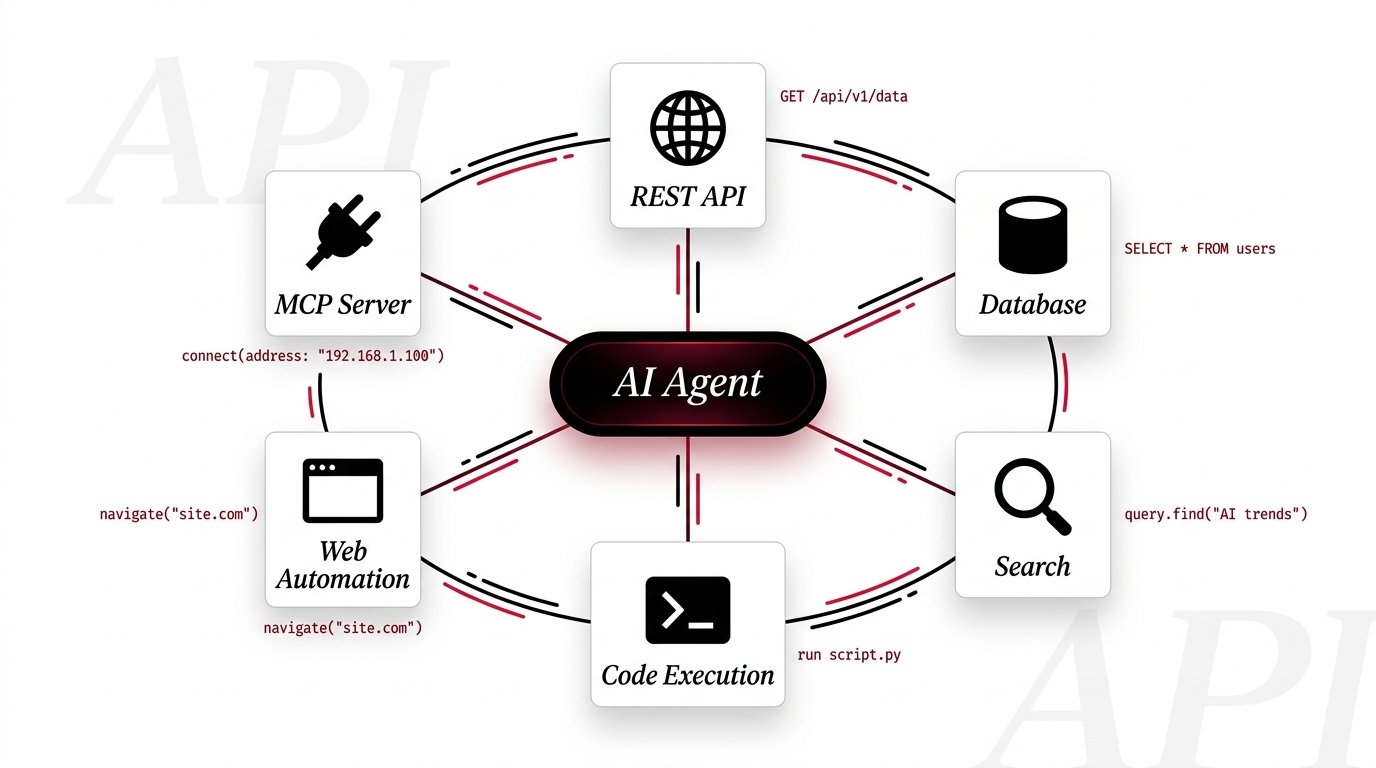
The Six Tool
Archetypes
Every external capability an AI agent needs falls into one of six categories. Master these and you can build an agent that does almost anything.
Tool Calling
in Practice
Modern LLMs like Claude use structured tool definitions and a request-response cycle to call external functions with precision and type safety.
How Tool Calling Works
The agent sends a message with a list of available tools. The LLM decides
when and how to call them — returning a structured
tool_use block the agent executes.
This is not prompt engineering magic — it is a first-class API feature that yields deterministic, schema-validated calls every time.
# 1. Define the tool schema
tools = [{
  "name": "get_weather",
  "description": "Fetch live weather data",
  "input_schema": {
    "type": "object",
    "properties": {
      "city": {
        "type": "string",
        "description": "City name"
      }
    },
    "required": ["city"]
  }
}]

# 2. Send to Claude with tools
response = client.messages.create(
  model="claude-sonnet-4-20250514",
  tools=tools,
  messages=[{
    "role": "user",
    "content": "Weather in Chennai?"
  }]
)

# 3. Execute the tool call
for block in response.content:
  if block.type == "tool_use":
    result = get_weather(block.input["city"])
    # Return result back → LLM generates answer
    send_tool_result(block.id, result)
Integration Patterns
That Scale
Beyond basic tool calling, these architectural patterns determine how well your agent performs in complex, real-world deployments.
- Embed query → search vector store → retrieve top-k chunks
- Append retrieved context to the system prompt dynamically
- Use hybrid BM25 + semantic search for best recall
- Re-rank results with a cross-encoder for precision
- Planner agent breaks goal into atomic sub-tasks
- Worker agents execute with specialized tool access
- Critic agent validates outputs before finalizing
- Use message queues or async for parallel execution
- Exponential backoff with jitter on 5xx errors
- Circuit breaker pattern to prevent cascade failures
- Fallback to cached data or alternative API providers
- Always surface uncertainty to the user if resolution fails
- Docker / gVisor for process-level isolation
- Resource limits: CPU, memory, network, file system
- Allowlist external domains and output destinations
- Human-in-the-loop approval for destructive operations
Best Practices
Reference Table
Distilled from production deployments. Green = do this. Yellow = situational. Red = avoid.
| Practice | Category | Status | Notes |
|---|---|---|---|
Write precise tool descriptions |
Tool Design | Essential | The LLM selects tools based on description quality. Vague names cause wrong selections. |
Use typed JSON Schema for parameters |
Tool Design | Essential | Enforces structured output; prevents hallucinated arguments breaking downstream code. |
Limit tools per agent to < 20 |
Architecture | Situational | Too many tools degrades selection accuracy. Use router agents to partition tool namespaces. |
Return structured errors from tools |
Reliability | Essential | Include error_code + message so the agent can self-correct rather than hallucinating a fix. |
Expose raw API keys to the agent |
Security | Never | Always proxy secrets server-side. The agent should invoke a wrapper, not authenticate directly. |
Log every tool call + result |
Observability | Essential | Structured traces (e.g. OpenTelemetry) are indispensable for debugging multi-step agent failures. |
Implement rate limit awareness |
Reliability | Essential | Track API quota usage and throttle proactively — don’t wait for 429 errors in production. |
Allow unlimited autonomous actions |
Safety | Never | Always define a maximum step count and require human confirmation for high-impact operations. |
Cache deterministic tool results |
Performance | Recommended | TTL-based caching on read-only APIs (weather, stocks) cuts latency and cost dramatically. |
Use MCP for new integrations |
Architecture | Recommended | The standardized protocol reduces boilerplate and enables reusable server packages. |