

- [Long-Lasting] Each towel is designed to withstand hundreds of washes without fraying or losing its effectiveness. The t…
- [Premium, Lint-Free & Scratch-Free] Made from high-quality microfiber fabric, these towels are soft, lint-free, and scra…
- [Tear-Away Convenience & Easy to Use] KitchLife Microfiber towel rolls feature a unique tear-away design with 20 sheets …
Managing Context Windows
& Token Constraints
A practitioner’s guide to understanding, measuring, and optimising the finite memory of large language models.
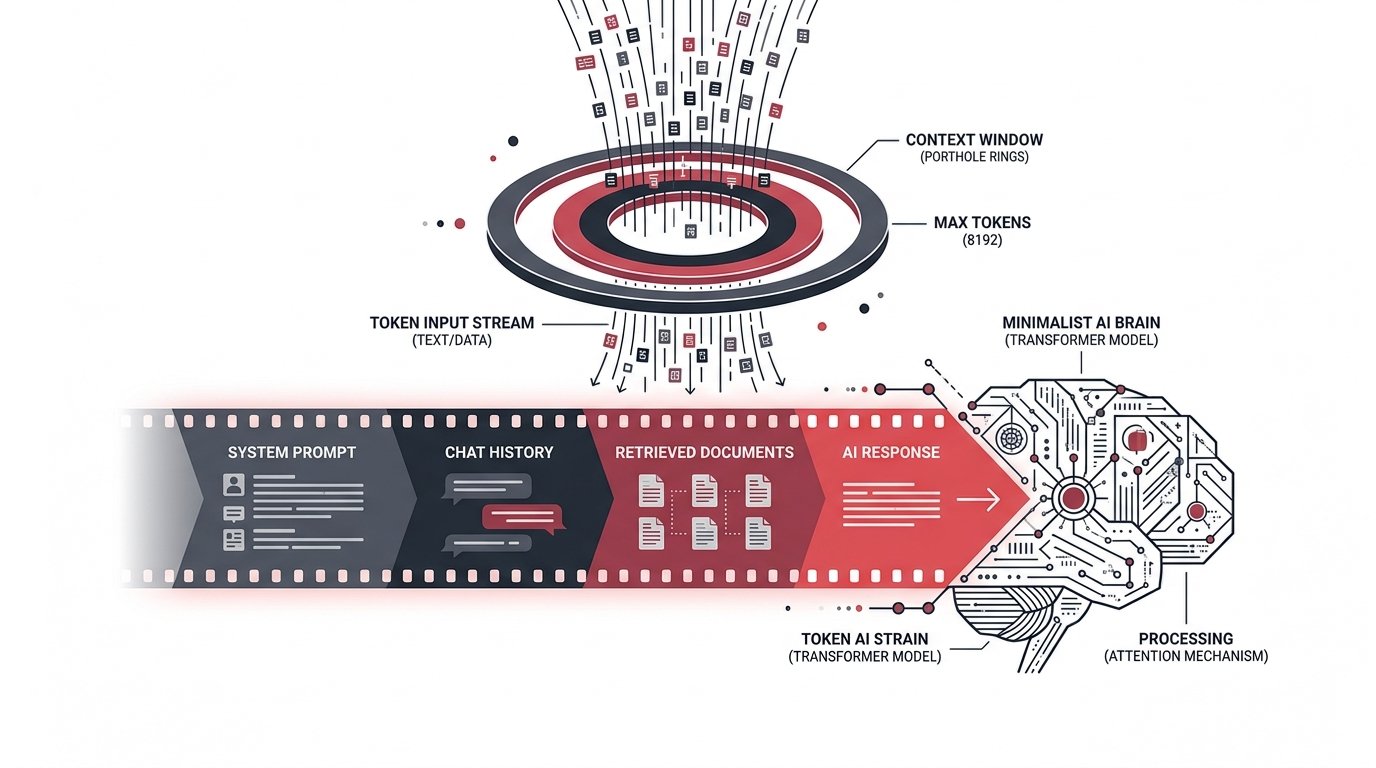
Every large language model reads the world through a porthole — fixed in size, finite in scope. That porthole is the context window: a hard ceiling on how many tokens a model can see at once, spanning your system prompt, the entire conversation history, any retrieved documents, and the response it must generate.
Exceed it and older content silently vanishes. Approach it carelessly and quality degrades, costs spike, and latency balloons. Managing this constraint is not an afterthought — it is a core engineering discipline.
A token is the atomic unit of LLM text — roughly ¾ of an English word on average. A 128 k-token context holds approximately 96,000 words, or a short novel. Sounds generous until you factor in multi-turn history, dense retrieval chunks, and verbose system prompts.
The strategies on this page are drawn from production deployments at scale. They apply whether you are building a simple chatbot or an agentic pipeline that spans dozens of tool calls.
What fills a
context window?
Six ways to stay within
the window
Sliding Window Truncation
Drop the oldest turns first while always preserving the system prompt and the most recent N exchanges. Simple, deterministic, and zero extra cost. Loses long-term coherence on extended sessions.
SimplestSummarise-and-Replace
When history fills past a threshold, compress older turns into a concise summary using a fast, cheap model. Inject the summary as a synthetic message. Preserves narrative continuity at the cost of a summarisation call.
RecommendedRetrieval-Augmented Generation
Store knowledge in a vector index. Retrieve only the top-K most relevant chunks per turn instead of dumping an entire knowledge base into the prompt. Keeps the context lean and semantically focused.
ProductionPrompt Compression
Use models like LLMLingua or Selective Context to drop low-entropy tokens from long documents before they enter the prompt. Can cut document length 3–5× with minimal quality loss.
AdvancedHierarchical Memory
Maintain three tiers: in-context (hot), vector store (warm), and structured DB (cold). A memory manager agent decides what to promote or evict. Scales to arbitrarily long sessions.
AgenticResponse Reservation
Always pre-subtract your expected max output tokens from the available budget before filling with inputs. Prevents the model from being truncated mid-response — a silent and embarrassing failure mode.
EssentialToken-aware
message trimming
The snippet opposite implements a production-grade context manager in Python. It trims history from the oldest turn inward, always preserving the system prompt and reserving headroom for the model’s response.
Key design decisions baked in:
- Uses tiktoken for byte-pair-encoded counting — fast and accurate
- Reserves output budget before calculating available input space
- Never drops the system prompt regardless of pressure
- Logs warnings before the window is critically full
import tiktoken

class ContextManager:
    def __init__(self,
                 model: str = "gpt-4o",
                 max_tokens: int = 128_000,
                 reserve_output: int = 4_096):
        self.enc = tiktoken.encoding_for_model(model)
        self.budget = max_tokens - reserve_output

    def count(self, text: str) -> int:
        return len(self.enc.encode(text))

    def trim(self,
             system: str,
             messages: list) -> list:
        sys_tokens = self.count(system)
        available = self.budget - sys_tokens
        result, used = [], 0

        # Walk history newest-first
        for msg in reversed(messages):
            cost = self.count(msg["content"])
            if used + cost > available:
                break
            result.insert(0, msg)
            used += cost

        return result

    def utilisation(self, system, messages):
        used = sum(
            self.count(m["content"])
            for m in messages
        ) + self.count(system)
        return used / self.budget
Context windows
across major models
| Model | Context Window | Output Limit | Recommended Use |
|---|---|---|---|
| Claude 3.5 Sonnet | 200 k tokens | 8 192 | Long-document analysis, dense RAG pipelines |
| GPT-4o | 128 k tokens | 16 384 | Extended agent loops, multi-doc reasoning |
| Gemini 1.5 Pro | 1 M tokens | 8 192 | Full codebase ingestion, video transcripts |
| GPT-4o mini | 128 k tokens | 16 384 | Cost-sensitive workloads with manageable context |
| Llama 3.1 70B | 128 k tokens | 4 096 | Open-weight deployments, on-prem fine-tuning |
| Mistral 7B | 32 k tokens | 8 192 | Edge deployment, latency-critical paths |
Count before you call
Always measure token usage before sending a request. Surprises at the API boundary are expensive and unrecoverable in production.
Compress aggressively
Whitespace, repeated boilerplate, and verbose system prompts add up. Every saved token is latency and cost recovered at scale.
Externalise memory
Don’t fight the window — work around it. Vector stores and structured databases are infinitely scalable; context windows are not.
Monitor utilisation
Track context utilisation per request as a metric. Alert at 80%. Hitting 95% regularly indicates an architectural issue, not a tuning one.